

Command Cheat Sheet
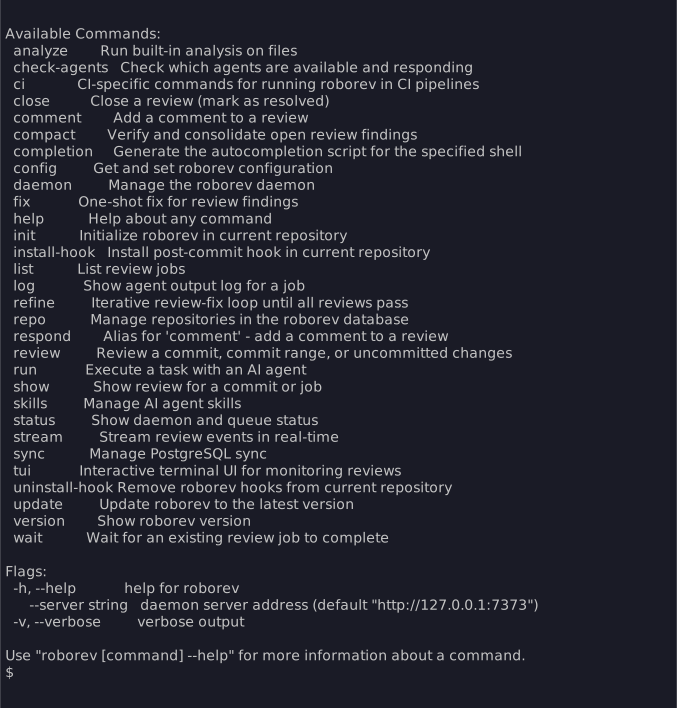
Essentials
roborev init [--agent <name>] # Initialize repo + daemon + hook # --no-daemon: skip auto-starting daemonroborev fix # Fix open reviewsroborev status # Check daemon and queueroborev summary # Aggregate review statisticsroborev insights # Analyze review patternsroborev tui # Interactive terminal UI # --repo: pre-filter to repo # --branch: pre-filter to branch # --no-quit: suppress keyboard quit # --control-socket: custom socket pathroborev version # Show versionReviewing Code
# Single commitsroborev review                   # Review HEADroborev review <sha>             # Review specific commit
# Commit rangesroborev review <start> <end>     # Review range (inclusive)roborev review --since <commit>  # Review since commit (exclusive)roborev review --since HEAD~5    # Review last 5 commits
# Branch reviewsroborev review --branch          # All commits since diverged from mainroborev review --branch=feature-xyz     # Review a specific branchroborev review --branch --base develop  # Against specific base
# Uncommitted changesroborev review --dirty           # Review working tree
# Review typesroborev review --type security # Security-focused reviewroborev review --type design # Design-focused review| Flag | Description |
|---|---|
--wait | Block until review completes (intended for CI, scripting, and orchestrators; not recommended in interactive agent sessions) |
--quiet | Only show progress/elapsed time |
--branch [name] | Review all commits on branch since base (optionally specify branch name) |
--base <branch> | Base branch for --branch comparison (default: auto-detect) |
--agent <name> | Use specific agent for review |
-m, --model <model> | Model to use (format varies by agent) |
--type <type> | Review type (security, design) — changes system prompt |
--reasoning <level> | Set reasoning depth (maximum/thorough/standard/fast) |
--fast | Shorthand for --reasoning fast |
--min-severity <level> | Only report findings at or above this severity (low/medium/high/critical) |
--local | Run review locally without the daemon (streams output to console) |
--repo <path> | Specify repository path |
See: Reviewing Code
Waiting for Reviews
roborev wait # Wait for most recent job for HEADroborev wait abc123 # Wait for most recent job for commitroborev wait 42 # Job ID (if "42" is not a valid git ref)roborev wait 42 43 44 # Wait for multiple jobsroborev wait --job 42 # Force as job IDroborev wait --sha HEAD~1 # Wait for job matching HEAD~1roborev wait --quiet # Suppress output (for hooks/agents)| Flag | Description |
|---|---|
--sha <ref> | Git ref to find the most recent job for |
--job | Force argument to be treated as job ID |
-q, --quiet | Suppress output (exit code only) |
Unlike roborev review --wait, this does not enqueue a new review. It waits for an already-running job, making it useful when a post-commit hook has already triggered the review. For most interactive workflows, use roborev tui to browse completed reviews instead of blocking.
See: Reviewing Code
Viewing Reviews
roborev show # Show review for HEADroborev show <sha> # Show review for commitroborev show <job_id> # Show review by job IDroborev show --job <id> # Force interpretation as job IDroborev show --prompt <job_id> # Show the prompt sent to the agentroborev list # List jobs for current repo/branchroborev list --open # List only open reviewsroborev list --closed # List only closed reviewsroborev tui # Interactive browserroborev tui --repo --branch # Pre-filtered to current repo+branchroborev log <job_id> # View job log| Flag | Description |
|---|---|
--job | Force interpretation as job ID |
--prompt | Show the prompt sent to the agent instead of the review output |
--json | Output as JSON for machine-readable workflows |
roborev show displays review comments after the review output when comments exist, matching the layout in the TUI review detail view.
See: Terminal UI
Job Logs
roborev log <job-id>             # Human-friendly rendered outputroborev log --raw <job-id>       # Raw NDJSON bytesroborev log --path <job-id>      # Print the log file path
roborev log clean # Remove logs older than 7 daysroborev log clean --days 3 # Remove logs older than 3 days| Flag | Description |
|---|---|
--raw | Print raw NDJSON without formatting |
--path | Print the log file path instead of contents |
Job logs are persisted to ~/.roborev/logs/jobs/ so agent output remains available after daemon restarts. By default, roborev log renders NDJSON into compact, human-readable progress lines showing tool calls and agent text. Use --raw for the original NDJSON when scripting or debugging.
The clean subcommand removes log files older than the specified number of days (default: 7).
Commenting on Reviews
roborev comment <job_id> "message" # Add comment with messageroborev comment <job_id> # Opens editorroborev close <job_id> # Mark as closedroborev close <job_id> --reopen # Reopen a closed review| Flag | Description |
|---|---|
--message, -m | Comment message (inline) |
--commenter | Name of commenter |
--job | Force interpretation as job ID |
Auto-Fix Agentic Loop
roborev refine # Fix failed reviews on branchroborev refine --max-iterations 5roborev refine --since HEAD~3 # Refine specific rangeroborev refine --quiet # Show elapsed time onlyroborev refine --list # Preview what would be refinedroborev refine --all-branches # Refine all branches with failuresroborev refine --branch feature # Validate branch before refiningroborev refine --min-severity high # Only fix high and critical findings| Flag | Description |
|---|---|
--agent <name> | Use specific agent |
-m, --model <model> | Model to use (format varies by agent) |
--reasoning <level> | Set reasoning depth |
--fast | Shorthand for --reasoning fast |
--max-iterations <n> | Limit fix attempts (default: 10) |
--since <commit> | Refine commits since specific commit |
--branch <name> | Validate current branch before refining |
--all-branches | Discover and refine all branches with failed reviews (implies --open) |
--list | List failed reviews that would be refined without running |
--newest-first | Process newest first (requires --all-branches or --list) |
--quiet | Only show progress/elapsed time |
--allow-unsafe-agents | Allow agents without sandboxing |
--min-severity <level> | Only fix findings at or above this severity (low/medium/high/critical) |
See: Auto-Fix Agentic Loop with Refine
Fixing Reviews
roborev fix # Fix all open reviews on this branchroborev fix 123 # Fix a specific review by job IDroborev fix 42 43 44 # Fix multiple reviews sequentiallyroborev fix --batch # Batch all open into one agent promptroborev fix --batch 42 43 44 # Batch specific jobs into one promptroborev fix --branch main # Fix all open on a specific branchroborev fix --all-branches # Fix all open across all branchesroborev fix --list # List open reviews without fixingroborev fix --min-severity medium # Skip low-severity findings| Flag | Description |
|---|---|
--agent <name> | Use specific agent |
-m, --model <model> | Model to use |
--reasoning <level> | Set reasoning depth |
--quiet | Suppress agent output |
--branch <name> | Filter by branch (default: current branch) |
--all-branches | Include open jobs from all branches |
--batch | Concatenate multiple reviews into a single agent prompt instead of fixing one at a time |
--list | List open reviews with details (job ID, ref, branch, agent, verdict) without running any fixes |
--newest-first | Process jobs newest first instead of oldest first |
--min-severity <level> | Only fix findings at or above this severity (low/medium/high/critical) |
See: Assisted Refactoring
Consolidating Reviews
roborev compact # Enqueue consolidation (background)roborev compact --wait # Wait for completionroborev compact --branch main # Compact jobs on main branchroborev compact --all-branches # Compact jobs across all branchesroborev compact --dry-run # Show what would be doneroborev compact --limit 10 # Process at most 10 jobsroborev compact --agent claude-code # Use specific agent for verificationroborev compact --reasoning thorough # Use thorough reasoning level| Flag | Description |
|---|---|
--wait | Block until consolidation completes |
--branch <name> | Filter by branch (default: current branch) |
--all-branches | Compact jobs across all branches |
--dry-run | Preview what would be done without running |
--limit <n> | Maximum number of jobs to process (default: 20) |
--agent <name> | Agent for verification |
-m, --model <model> | Model to use |
--reasoning <level> | Set reasoning depth (thorough/standard/fast) |
--timeout <duration> | Timeout for --wait mode (default: 10m) |
--quiet | Suppress progress output |
Compact discovers open completed reviews, sends them to an agent for verification against the current codebase, and consolidates related findings into a single review job. Original jobs are automatically closed when consolidation finishes. This adds a quality layer between review and fix to reduce false positives.
Review Statistics
roborev summary # Last 7 days, current reporoborev summary --all # Last 7 days, all reposroborev summary --since 30d # Last 30 daysroborev summary --branch main # Filter by branchroborev summary --repo /path/to/reporoborev summary --json # Structured output for scripting| Flag | Description |
|---|---|
--since <duration> | Time window (e.g. 24h, 7d, 30d; default: 7d) |
--branch <name> | Scope to a single branch |
--repo <path> | Scope to a single repo (default: current repo) |
--all | Show summary across all repos (mutually exclusive with --repo) |
--json | Structured output for scripting |
The summary includes:
- Overview: Job counts by status (done, failed, canceled, queued, running)
- Verdicts: Pass/fail counts, pass rate, and resolution rate for addressed failures
- Agent breakdown: Per-agent job counts, pass rate, and median review duration
- Duration: Review and queue time percentiles (p50, p90, p99)
- Job types: Counts by job type (review, fix, task, etc.)
- Repos (with
--all): Per-repo breakdown with pass/fail/addressed counts - Failures: Total failures, retries, and error categories
Insights
roborev insights # Analyze last 30 daysroborev insights --since 7d # Last 7 daysroborev insights --branch main # Filter to main branchroborev insights --repo /path/to/repo # Specific repositoryroborev insights --agent gemini # Use specific agentroborev insights --wait=false # Enqueue without waitingroborev insights --json # Output as JSON| Flag | Description |
|---|---|
--since <duration> | Time window for reviews (e.g. 7d, 30d, 90d, 2w; default: 30d) |
--branch <name> | Scope to a single branch |
--repo <path> | Scope to a single repo (default: current repo) |
--agent <name> | Agent to use for analysis |
-m, --model <model> | Model to use |
--reasoning <level> | Set reasoning depth (thorough/standard/fast) |
--wait | Wait for completion and display result (default: true) |
--json | Output job info as JSON |
Analyzes failing code reviews to identify recurring patterns and suggest improvements to review guidelines. The command queries completed reviews (focusing on failures) within the time window, includes the current review_guidelines from .roborev.toml as context, and sends the batch to an agent for structured analysis.
The agent produces:
- Recurring finding patterns across reviews
- Hotspot areas (files/packages with concentrated failures)
- Noise candidates (findings consistently dismissed without code changes)
- Guideline gaps (patterns flagged by reviews but not covered by guidelines)
- Suggested guideline additions (concrete text for
.roborev.toml)
If no failing reviews match the time window and branch filter, the command exits with a message instead of queuing a job.
Token Usage
Token usage is tracked automatically for completed jobs when agentsview is installed. Usage appears in the TUI review header and roborev show output (e.g. 118.0k ctx · 28.8k out).
To backfill token data for older jobs:
roborev backfill-tokens # Fetch token data for all eligible jobsroborev backfill-tokens --dry-run # Preview without writing| Flag | Description |
|---|---|
--dry-run | Preview candidates without fetching or storing data |
The backfill scans completed jobs that have a session ID but no stored token usage. Jobs whose session files have been deleted are skipped.
CI Review
roborev ci review # Auto-detect from GitHub Actions envroborev ci review --ref HEAD~3..HEAD # Explicit ref rangeroborev ci review --gh-repo myorg/myrepo --pr 42 # Explicit repo and PRroborev ci review --agent codex --agent gemini # Multiple agentsroborev ci review --comment # Post results as PR comment| Flag | Description |
|---|---|
--ref <range> | Git ref or range to review (default: auto-detect from GITHUB_REF) |
--comment | Post results as a PR comment via gh |
--gh-repo <owner/repo> | GitHub repo (default: GITHUB_REPOSITORY env var) |
--pr <number> | PR number (default: extracted from GITHUB_EVENT_PATH) |
--agent <names> | Agents to use (repeatable, default: auto-detect) |
--review-types <types> | Review types to run (comma-separated: security, design, default) |
--reasoning <level> | Reasoning depth (thorough/standard/fast) |
--min-severity <level> | Minimum severity to report (low/medium/high/critical) |
--synthesis-agent <name> | Agent for combining multi-job results |
Runs a one-shot review without a daemon or database. Designed for CI pipelines where you want review results as part of the build, not as a background service.
In GitHub Actions, ci review auto-detects GITHUB_REPOSITORY, GITHUB_REF, and GITHUB_EVENT_PATH so you can run it with no flags. Outside GitHub Actions, pass --gh-repo and --ref explicitly.
Exit codes: 0 on success or when all agents were skipped due to quota exhaustion, non-zero on real failures.
See: GitHub Integration
GitHub Actions Setup
roborev init gh-action # Generate workflow fileroborev init gh-action --agent codex # Specify agentsroborev init gh-action --output .github/workflows/review.ymlroborev init gh-action --force # Overwrite existingroborev init gh-action --roborev-version 0.34.0 # Pin version| Flag | Description |
|---|---|
--agent <names> | Agents to include in the workflow (repeatable) |
--output <path> | Output path (default: .github/workflows/roborev.yml) |
--force | Overwrite an existing workflow file |
--roborev-version <ver> | Pin roborev version in the workflow (default: latest) |
Generates a GitHub Actions workflow that:
- Checks out the repository
- Downloads and installs roborev with SHA256 verification
- Runs
roborev ci review --commenton each PR - Posts review results as PR comments
Agent API keys are read from repository secrets (e.g. ANTHROPIC_API_KEY for Claude Code, OPENAI_API_KEY for Codex). Add the required secrets in your repository’s Settings > Secrets and variables > Actions.
See: GitHub Integration
Code Analysis
roborev analyze duplication ./... # Find duplicationroborev analyze refactor --fix *.go # Suggest and apply refactorsroborev analyze complexity --per-file src/*.go # One job per fileroborev analyze test-fixtures internal/*_test.go # Find test helper opportunitiesroborev analyze refactor --branch # Analyze changed files on branchroborev analyze refactor --branch=feature-xyz # Analyze a specific branchroborev analyze --list # List analysis types| Flag | Description |
|---|---|
--agent <name> | Use specific agent |
-m, --model <model> | Model to use |
--reasoning <level> | Set reasoning depth |
--wait | Wait for completion and display result |
--quiet | Suppress output |
--branch [name] | Analyze files changed on branch (optionally specify branch name) |
--base <branch> | Base branch for --branch comparison (default: auto-detect) |
--per-file | One analysis job per file |
--fix | Analyze then apply fixes automatically |
--fix-agent <name> | Agent for fix step |
--json | Output job info as JSON |
--list | List available analysis types |
--show-prompt <type> | Show prompt template |
See: Assisted Refactoring
Custom Agent Tasks
roborev run "Explain the architecture"roborev run --wait "Review src/auth/ for security issues"roborev run "Find simplification opportunities in src/utils/"roborev run --agentic "Add input validation to all endpoints"cat review-checklist.txt | roborev run --wait| Flag | Description |
|---|---|
--wait | Wait for completion and display result |
--quiet | Only show progress/elapsed time |
--agent <name> | Use specific agent |
--reasoning <level> | Set reasoning depth |
--agentic, --yolo | Enable agentic mode (can modify files) |
--no-context | Don’t include repository context |
--label <string> | Custom label displayed in TUI (default: run) |
See: Custom Agent Tasks
Configuration
roborev config get <key>             # Get value (merged: local then global)roborev config get <key> --global    # Get from global config onlyroborev config get <key> --local     # Get from repo config only
roborev config set <key> <value>     # Set in repo config (default)roborev config set <key> <value> --global  # Set in global config
roborev config list # List merged configroborev config list --show-origin # Show where each value comes from| Flag | Description |
|---|---|
--global | Use global config (~/.roborev/config.toml) |
--local | Use repo config (.roborev.toml) |
--show-origin | Show origin column (global/local/default) in list output |
See: Configuration
Repository Management
roborev repo list # List all reposroborev repo show <name> # Show repo detailsroborev repo rename <old> <new> # Rename display nameroborev repo delete <name> # Remove from trackingroborev repo merge <src> <dst> # Merge reviews between reposDaemon & Hooks
roborev daemon start             # Start background daemonroborev daemon stop              # Stop daemonroborev daemon restart           # Restart daemonroborev daemon run               # Run in foreground
roborev post-commit # Hook entry point (called by git hook)roborev install-hook # Install post-commit hookroborev install-hook --force # Overwrite existing hook with a fresh oneroborev uninstall-hook # Remove hook| Flag | Description |
|---|---|
--force | Overwrite an existing post-commit hook with a fresh one |
Post-Commit Hook Entry Point
roborev post-commit is the command the git hook calls after each commit. You do not need to run it manually. It silently exits on any error so hooks never block commits.
roborev post-commit # Called by the git post-commit hook| Flag | Description |
|---|---|
--repo <path> | Path to git repository (default: current directory) |
--base <branch> | Base branch for branch review comparison |
By default, post-commit reviews the single commit at HEAD. To review the entire branch (all commits since diverging from the base branch) instead, set post_commit_review = "branch" in .roborev.toml:
post_commit_review = "branch"When set to "branch", each commit triggers a merge-base..HEAD range review. On the base branch itself, detached HEAD, or any error, it falls back to a single-commit review.
See: Configuration
Checking Agents
roborev check-agents # Smoke-test all installed agentsroborev check-agents --agent codex # Test a specific agentroborev check-agents --timeout 30 # Set timeout per agent (seconds)| Flag | Description |
|---|---|
--agent <name> | Test only this agent |
--timeout <secs> | Timeout per agent (default: 60) |
Agent Skills
roborev skills install # Install skills for agentsroborev skills update # Update installed skillsSee: Agent Skills
Sync & Streaming
roborev sync status              # Show PostgreSQL sync statusroborev sync now                 # Trigger immediate sync
roborev stream                   # Stream all events (JSONL)roborev stream --repo .          # Filter to current repo
See: PostgreSQL Sync, Event Streaming
Multi-Repo Workspaces
roborev list looks in immediate child subfolders for repositories, so you can run it from a parent directory that contains multiple repos. roborev review suggests repo-level review commands when run from a workspace root, making it easy to review across projects.
Global Flags
These flags work across most commands:
| Flag | Description |
|---|---|
--server <addr> | Daemon address (default: http://127.0.0.1:7373). Accepts unix:// for Unix domain sockets |
-v, --verbose | Verbose output |
Update
roborev update # Update to latest versionroborev update --force # Force update (useful for dev builds)